

You may be wondering in the first place, what is a favicon? And why do you need one on your website?
Favicon is a strange word. It’s short for “Favourite icon”. It’s also called a browser icon. You’ve already seen it several times, maybe without thinking about it. Take your online newspaper, and you’ll see a tiny tiny square graphic in the browser tab. It’s typically a small logo of some kind.
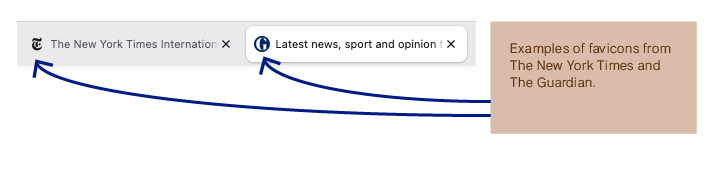
Improve the site’s user experience. It’s a subtle but important detail of your website. Your visitors recognise your brand. It’s often overlooked. It’s a detail, but if you want a great-looking site, you should add a favicon.
Another reason why adding a favicon is a good idea, is because people tend to have multiple tabs open at the same time. Here, the favicon serves as a good guide for the user.
Instead of having the small icon of the Showit platform, you can use a small graphic, it could be a logo, or something else that reminds you of your brand or brand name.
Here’s what to do..
How to make your own favicon
As you might expect from its small size, you have some limitations on how much detail you can add to your favicon. Make it simple. You could go with a small version of your logo or a detail of it. That is, if you have a logo. Another solution is to use the first letter of your brand name.
Don’t overthink it. You can always change it later.
There are several tools you can use to make your favicon:
You can make it in a graphics program like Adobe Illustrator, Adobe Photoshop or Canva. Or you can use a free online favicon generator tool, like favicon.io.
The size of the favicon should be 32*32 pixels.
The background has to be transparent.
Save the image in png.-format
Where to add the favicon
It’s very easy to add your newly designed favicon to your Showit website.
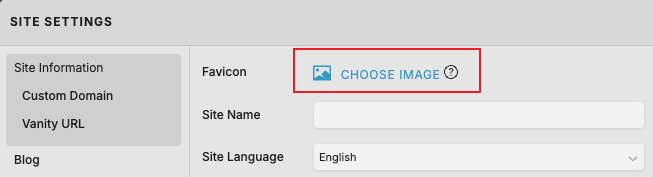
- Navigate to Site Settings
- Locate the favicon menu and click on Choose Image
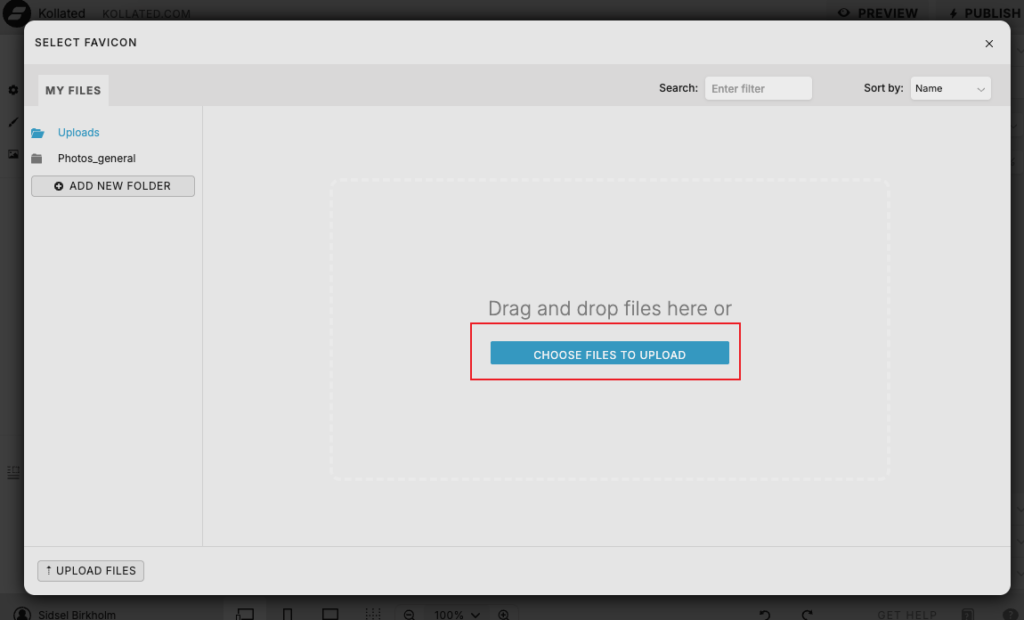
- Upload your favicon by clicking on Upload files. You find the button at the bottom left of the screen.
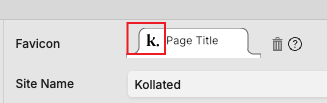
- Showit shows a preview of how the icon will look in your browser tab before you click Publish.
Final thoughts
A favicon is literally a tiny detail, but it definitely makes your website look much more professional. Your visitor sees it the moment that she opens your site. It signals that you’re taking care of your website and are aware of the details of a well-functioning site.
